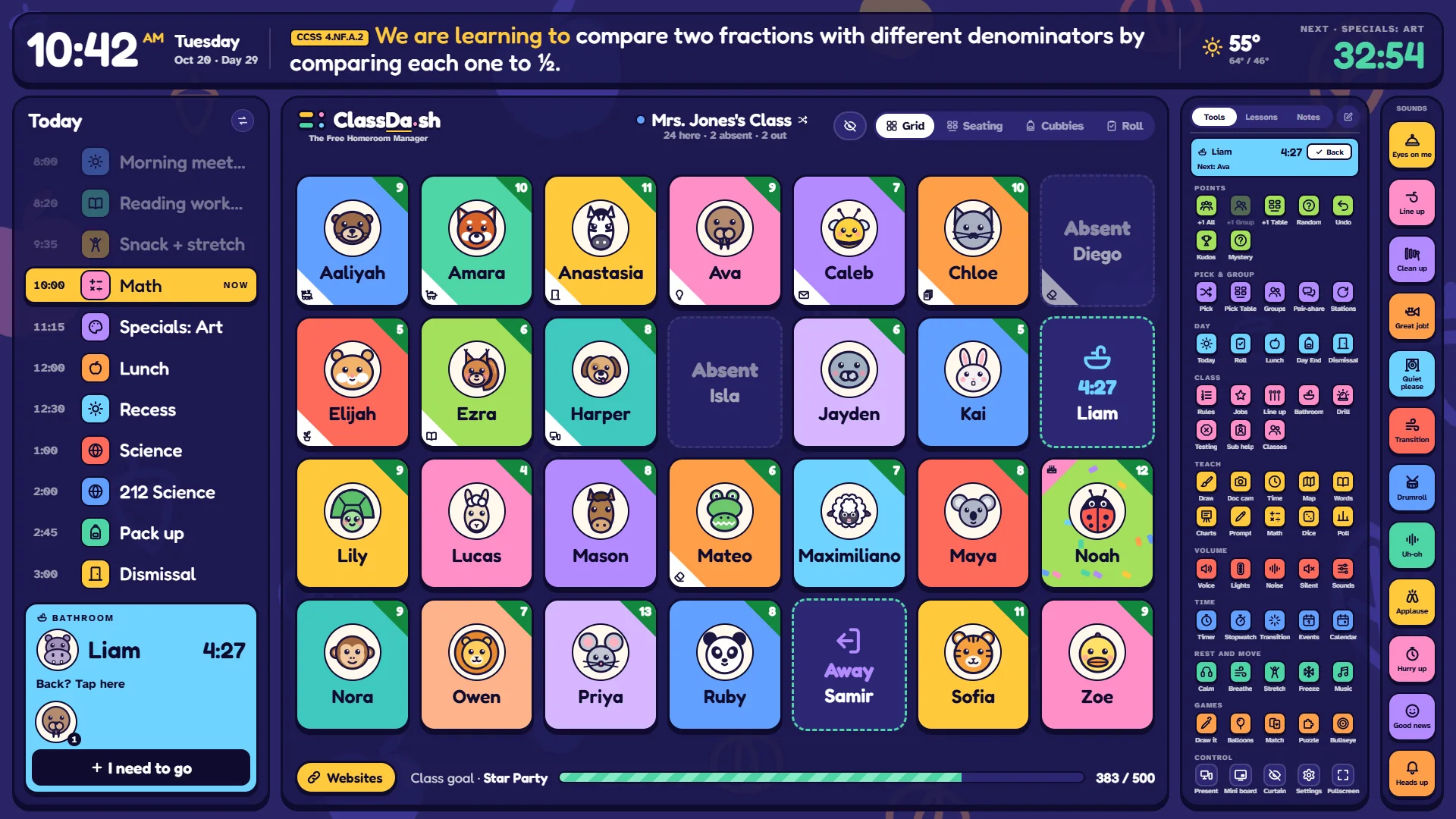
One screen to run the whole school day from the SMARTboard.
Your class, your schedule and every quick tool you reach for, on one board. Free, with no accounts, and your class list stays on your own computer: it's never sent to us.
Every child on a tile with a drawn animal, A–Z or by seating chart.
Positive-first points: +1 a child, a table, a group or the whole class, with a class goal to fill. A −1 is logged quietly with a reason and never shown on the board.
Attendance, a bathroom pass with a line, and who's out of class.
Pick a name, make groups, line up, class jobs.
Your day
Today's bell schedule, big enough to read from the back, with the next period counting down.
A learning target from your state's standards, one tap to put on the banner.
Today's weather, and “Day 46” of your school year. Tap the clock for the week ahead and countdowns, or the weather for the hours and the week ahead.
Lessons with timed plans, slides and assignments, kept in a library, and Notes to show a line big.
Quick tools
Timers (up to four), stopwatch, think-pair-share, dice, a coin to flip, a spinner and a random number, a traffic light and noise meter, voice levels, focus and rest music, breathing, a whiteboard with handwriting lines and graphic organizers, a calculator, a teaching clock (drag the hands or the digital numbers), sight words and a word wall, and anchor charts for your grade. Each one opens over the class and keeps running when you put it away.
Plus the class's own: jobs that move on every week, a countdown to the next big day, a morning check-in where kids tap their name and their lunch, with the count ready for the office, a secret mystery student, and a Drill button that puts a big headcount on the board (and keeps the board silent) for fire drills and lockdowns.
Built for the board
Laptop plugged into the board? Press Present: the board gets its own full-screen window that stays in step with your laptop.
Board with its own computer? Save a classroom file and open it there.
Made for Chrome and Edge, and keeps working when the Wi-Fi drops.
Getting started
About five minutes
Open classda.sh in Chrome or Edge on the computer connected to your board.
The setup guide asks for your class list (paste it straight from a spreadsheet), your grade and your school's town, then fills in a school year and a bell schedule for you to check. Skip anything you like.
Press Present to put the board on the big screen, or use full screen if the board is your only screen.
Once a week, save a classroom file (Settings → Records & safety) as a backup.
Want to look first? Choose Try the demo on the first screen. More for teachers is on the page for teachers.
Your class's information
Stays on your devices
There are no accounts. Names, points, attendance and notes are saved in the browser on your own computer, and they are never sent to us: we have no database to send them to. The board works offline after the first visit. The whole story, including the few things that do use the internet, is in the privacy policy.
For school IT teams
What to allow, and what it does
ClassDa.sh is a static website: plain HTML, JavaScript and pictures, with no logins, no server code and no database. Please categorize it as Education. The permissions it asks for, where a class is stored and our DPA are on the page for IT teams; principals and district offices have their own page.
Address
What it's for
Needed?
classda.sh
The board itself, this site, each state's standards list, and the list of US towns setup searches (on the device).
Yes
api.weather.gov
The weather for a school in the US, from the National Weather Service: now, by the hour and the week ahead (sends the town's latitude and longitude only, at most every 30 minutes).
Optional
www.youtube-nocookie.com
YouTube videos, in YouTube's privacy-enhanced player. Plays inside the board (a sandboxed frame) only when the teacher opens one.
Optional
player.vimeo.com
Vimeo videos, with Vimeo's do-not-track on. Plays inside the board (a sandboxed frame) only when the teacher opens one.
Optional
docs.google.com
Google Slides, Docs, Sheets and Forms that are shared. Plays inside the board (a sandboxed frame) only when the teacher opens one.
Optional
drive.google.com
Files shared from Google Drive. Plays inside the board (a sandboxed frame) only when the teacher opens one.
Optional
www.canva.com
Canva designs that are shared. Plays inside the board (a sandboxed frame) only when the teacher opens one.
Optional
padlet.com
Padlets, from Padlet's embed code. Plays inside the board (a sandboxed frame) only when the teacher opens one.
Optional
www.desmos.com
The Desmos calculators and saved graphs. Plays inside the board (a sandboxed frame) only when the teacher opens one.
Optional
www.geogebra.org
GeoGebra activities. Plays inside the board (a sandboxed frame) only when the teacher opens one.
Optional
Credits
Music
Freeze Dance and Relax play these songs. Loudness evened out and converted to a smaller file (Opus) by ClassDa.sh.
“Bright Pop Background Music” by AurosonMusic (Freeze Dance), from Free Music Archive, licensed under CC BY 4.0.
“Modern Happy Pop” by AurosonMusic (Freeze Dance), from Free Music Archive, licensed under CC BY 4.0.
“Lo-Fi - Chill LoFi Beat” by AurosonMusic (Relax), from Free Music Archive, licensed under CC BY 4.0.
“Lo-Fi - Coffee Break” by AurosonMusic (Relax), from Free Music Archive, licensed under CC BY 4.0.
“Lo-Fi - Dreamy” by AurosonMusic (Relax), from Free Music Archive, licensed under CC BY 4.0.
“Lo-Fi - Midnight” by AurosonMusic (Relax), from Free Music Archive, licensed under CC BY 4.0.
“Lo-Fi - Sunset” by AurosonMusic (Relax), from Free Music Archive, licensed under CC BY 4.0.
Who makes it
Free
Hi, I'm David. I build tools for teachers and keep them free. ClassDa.sh has no accounts and nothing to buy. If it helps your class, you can support it on Ko-fi.