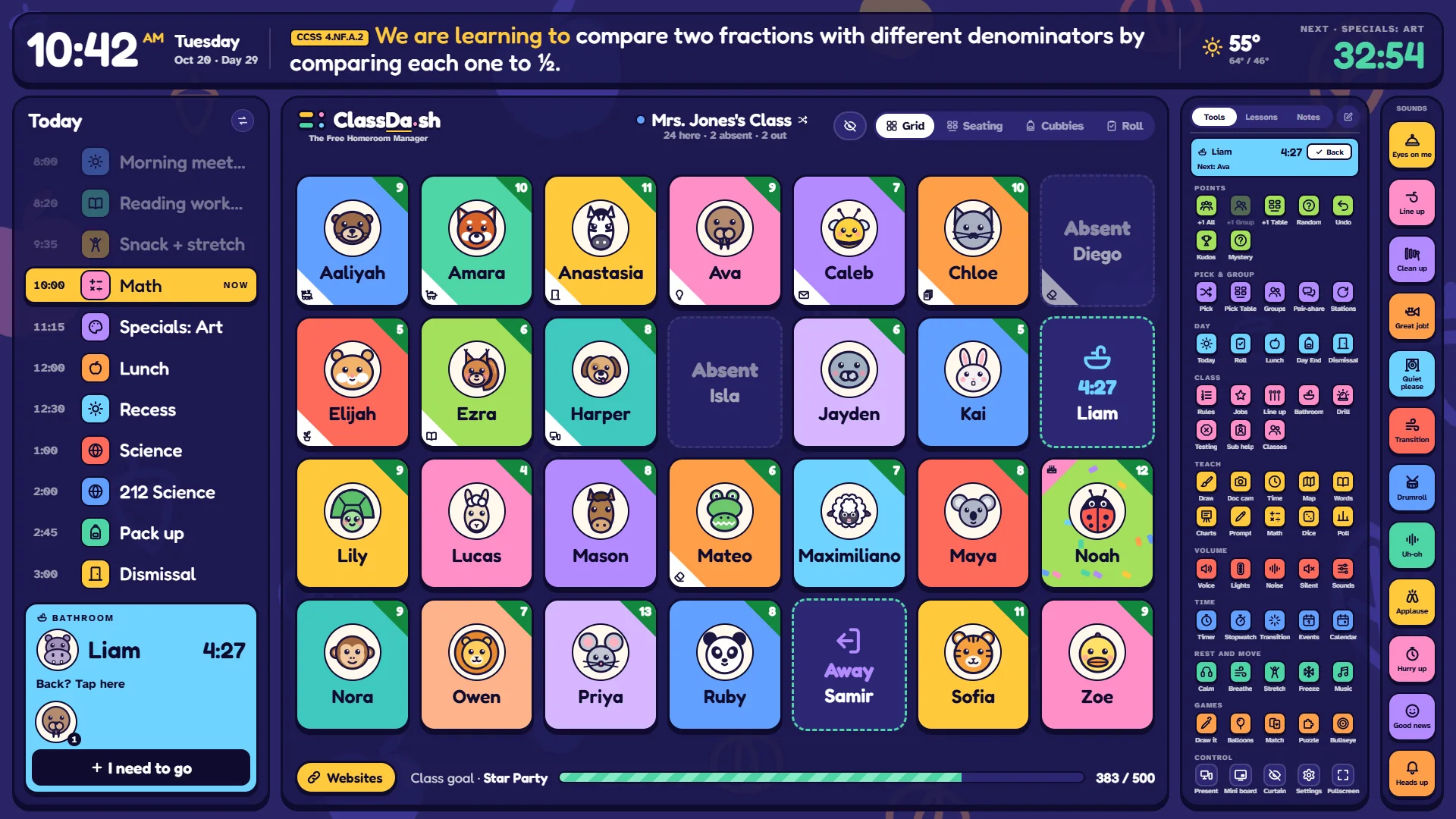
Stop juggling tabs. Your class, your schedule, your lesson and every quick tool you reach for are on one screen the whole room can read. Free, with no accounts, and your class list stays on your own computer.
Every child on a tile with their own picture: A–Z, by seating chart, in groups, or as the roll.
+1 a child, a table, a group or the whole class, toward a class goal. A −1 is logged quietly, never on the board.
Pick a student at random right on the board, then +1 them in one tap.
Attendance, a bathroom line kids sign up for, groups, line up and class jobs.
Your day
Today's bell schedule with the next period counting down, and transition time between blocks.
Learning targets from your state's standards on the banner.
Lesson plans with timed steps, slides and assignments, kept in a library to reuse.
Sub help on the board and printable sub plans, made from your plans.
Teach
Timers, a stopwatch, think-pair-share, dice and spinners, a whiteboard with handwriting lines and tracing letters (your class's names too), maps of the world, the US and your state, a number line, hundreds chart, ten frames, fraction bars, base ten and a calculator, money, a teaching clock, a doc cam, anchor charts, sight words and a word wall, polls, and videos that play right on the board.
Calm and move
Voice levels, a traffic light and a noise meter, a breathing circle, focus and rest music, stretch breaks led by a drawn kid, and brain-break games: Draw & Guess, Balloon Pop, Match Up, Freeze Dance, a whole-class Puzzle (picture sorts for the youngest, word pictures for the older grades) and Bullseye, a number puzzle.
Getting started
About five minutes
Open classda.sh in Chrome or Edge on the computer connected to your board.
Choose Try the demo to look around Mrs. Jones's class first, or Set up my class.
The guide asks for your class list (paste it straight from a spreadsheet), your grade and your school's town, then fills in a school year and a bell schedule for you to check. Skip anything you like. Already have your class list, calendar or bell schedule as files? Your district-approved AI can turn them into one file to import.
Press Present to put the board on the big screen, or use full screen if the board is your only screen.
Once a week, save a classroom file (Settings → Records & safety) as a backup. It's also how you move to a new computer.
Your class's information
Stays on your devices
There are no accounts. Names, points, attendance and notes are saved in the browser on your own computer, and never sent to us. The whole story is in the privacy policy. If your school's IT team asks, send them the page for IT teams.